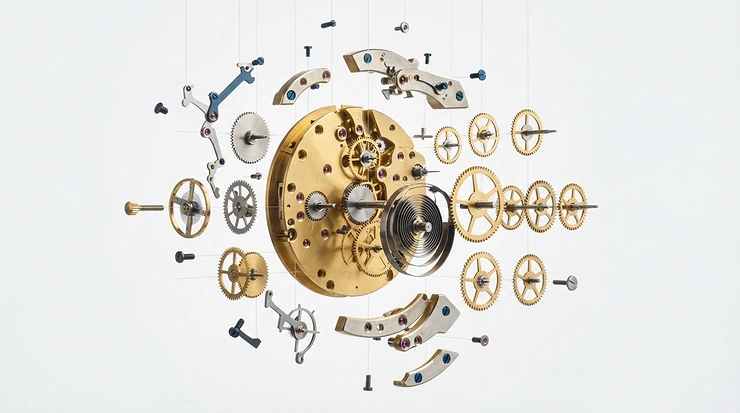
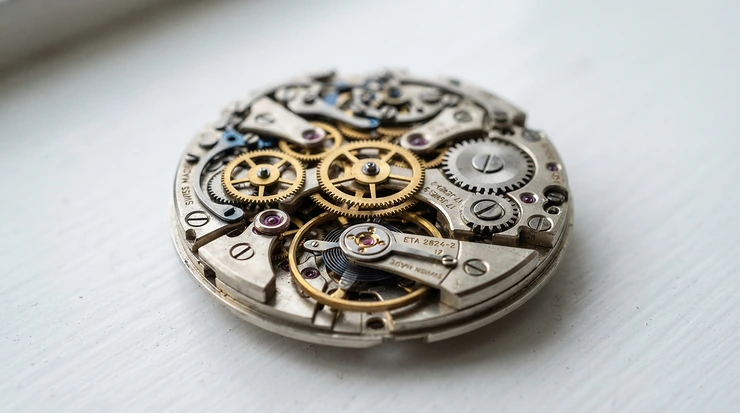
Choose the two complications you would check every week and ignore the rest of the dial. That is the short version of watch complications explained for 2027, and the logic is cost, not snobbery: a complication is any feature beyond hours, minutes and seconds, and Wikipedia’s horology entry says a typical date-display chronograph can run to about 250 parts.
Every extra function also asks something of you: a window to read, pushers to learn, a moon disc to correct, or a smartwatch slot to give up. This watch complications explained guide reads a dial in five moves, shows how Apple Watch handles the same idea in software, flags the mistakes that cost money, and then matches four real watches (one smartwatch, three analog) to the complication each one teaches best.
The findings rest on Apple’s support pages, maker and dealer spec sheets, reviews from Teddy Baldassarre, GearJunkie, Dappered and Two Broke Watch Snobs, and two long owner threads on Omega Forums and MacRumors; no watch was worn for this guide, so every comment on feel belongs to a named reviewer. Prices appear only as ranges from those pages, and the current figure on Amazon.com may differ.
The dial vocabulary: all watch complications explained in plain words
Seven features recur through the rest of this guide. The table says what to look for on the dial and what each one reports.
Complication
What to look for
What it reports
Date or day-date
One or two small windows near the edge of the dial
The calendar date, and sometimes the weekday
Chronograph
Small registers plus two pushers beside the crown
A stopwatch with its own start, stop and reset
Tachymeter
Numbers printed around the bezel or outer ring
Average speed over a fixed distance, read with the chronograph
GMT or dual time
A 24-hour hand or a second hour hand
The time in another zone, usually tied to UTC
Moon phase
A cut-out showing a disc with one or two moons
Where the moon sits in a cycle of about 29.5 days
Power reserve
A small gauge, often marked from empty to full
How much energy is left in a mainspring or solar cell
Annual or perpetual calendar
Month and date windows, sometimes with a moon
Month lengths handled automatically; a perpetual calendar also handles leap years
Wikipedia supplies the definitions for the chronograph, GMT and power reserve rows, and it adds that a watch carrying several complications is a grande complication, though no official definition exists. InsideHook and Prisma supply the calendar distinction. None of the four watches below carries an annual or perpetual calendar, so that row is for reading dials, not for shopping. A tachymeter, meanwhile, does nothing without a chronograph to time the trip.
Watch complications explained steps: read any dial in five moves
Run these in order on any watch, analog or digital, before you read a single spec sheet.
Start with what is not a complication. Hours, minutes and a seconds hand make a simple movement, according to Wikipedia. Everything else on the dial is the puzzle, so list every window, small circle and extra hand before you name any of them.
Match the shape to the function. A small aperture is usually the date or day. A cut-out with a rotating disc is a moon phase, a cycle NASA puts at about 29.5 days. Small registers with pushers beside the crown mean a chronograph, and an extra hand that laps the dial once in 24 hours points to a second time zone.
Read the outer ring. Numbers around the bezel are often a tachymeter: GearJunkie explains that you start the chronograph at the beginning of a fixed-distance trip, stop it at the end, and the long hand indicates average pace. A 24-hour scale on the inner ring, which A Blog to Watch describes on the Seiko 5 Sports GMT SSK005K1, pairs with a GMT hand.
Test the crown and pushers against the manual. Teddy Baldassarre notes the chronograph buttons start, stop and split or reset. Dappered adds that on the Timex Marlin Moon Phase 40mm a pusher at 2 o’clock sets the month sub-dial. Every watch hides its settings in different places, so read the crown positions before the first adjustment.
Check what powers it and what a stop costs. A battery or solar quartz watch can sit in a drawer without losing its place. An automatic runs down once its reserve ends, and a hand-set moon or calendar then no longer matches the sky or the date. Two Broke Watch Snobs gives about 40 hours of reserve for Seiko’s 4R34 automatic GMT, while Teddy Baldassarre and GearJunkie both give roughly six months for the Seiko V192 solar movement on a full charge.
Those five moves work on a smartwatch face as well, with one change in step five: the battery decides everything, and the data comes from software.
Apple Watch complications explained: the same idea, set in software
Wikipedia notes that smartwatches implement complications in software, which makes Apple Watch the quickest place to experiment. Apple’s watchOS guide describes the routine: press and hold the face, choose Edit, swipe to the far left, pick a slot, turn the Digital Crown to scroll the options, press the Crown to finish, then tap the face to switch to it. Only some faces support complications, and the last editing screen tells you whether yours does.
The options are app data, not mechanical features. Apple’s table lists Weather (air quality, conditions, humidity, rain, temperature, UV index and wind), Activity (rings and timeline) and Timers, and apps from the App Store can add more. Slots are the limit. Apple’s developer documentation says each face offers space for only a handful of complications, and members of a long MacRumors thread on the subject call those slots precious.
What do owners keep there? The same MacRumors members most often say they always want battery, date, activity rings, outside temperature and messages. One says outside temperature is the one complication they cannot do without, one abandoned a weather complication because it was imprecise, and one wants a steps-and-distance complication for a health plan’s walking incentive. That is a thread of individual preferences, so read it as a menu of ideas, not a verdict.
Different watch complications explained by how often owners reach for them
Specs say what a watch can do. Owners say what they actually use. On a long Omega Forums thread about the most useful complication, the date window and the chronograph were named most often. A watchmaker there times servicing steps on his chronograph daily, and a frequent traveler checks a second time zone dozens of times a day.
The same thread is blunt about the rest. Several members find setting the date tedious when rotating watches, one says a power reserve gauge mostly confirms that he wound the watch, one found moon phase useless despite its appeal, and a couple of others rarely touch a chronograph at all. GearJunkie’s reviewer says something similar about the tachymeter: not very useful in his own work, but fun.
The pattern is consistent enough to act on. The date is the one almost everyone checks, a second time zone repays travelers and people who work across zones, a chronograph repays anyone who times things, and a moon disc is for pleasure. Pay for the function you would reach for weekly, and treat the rest as decoration with a setting chore attached.
Watch complications explained tips: four mistakes that cost money
Paying for a function nobody asked for is the first. The Omega Forums comments above show how often owners skip what looks impressive, so decide which function you would check weekly before you shop, not after.
The second is treating a moon disc as maintenance-free. Two Broke Watch Snobs says a common 59-tooth display drifts and wants readjusting about every 2.5 to 3 years, while a more elaborate 135-tooth version stretches that to about 122 years. On a hand-set watch the same page describes the routine: set the hands to 6:30, advance the disc one day per click until it shows a full moon found on an online lunar reference, advance it by the days since that full moon, then reset the time.
Third, expecting a one-click hour jump on a GMT. Two Broke Watch Snobs reports that on the Seiko 4R34 the 24-hour GMT hand is adjusted with the crown and the local hour has no jump function. Anyone who changes zones often should read the manual for the exact routine first.
Fourth, forgetting that a smartwatch face is finite. Give your handful of slots to the three things you check hourly, and leave nice-to-have data in the app.
Four watches, each matched to one step of the method
Each pick below teaches a complication from steps two to five. None is ranked above another, because the right one depends on which function you would check weekly.
Watch
Complication it teaches
Power
Case
Apple Watch Series 12
Software complications, swapped at will
Rechargeable; up to 24 hours of normal use per Apple
42 mm or 46 mm
Seiko 5 Sports GMT SSK001
GMT second time zone
Automatic; about 40-hour reserve per a sibling review
42.5 mm, 13.6 mm thick
Seiko Prospex Speedtimer SSC813
Chronograph, tachymeter, power gauge
Solar; about six months on a full charge
39 mm, 13.3 mm thick
Timex Marlin Moon Phase 40mm
Moon phase with day, date and month
Quartz, battery
40 mm
Three of the four are analog, and each hides a different power source behind a different complication. The Apple Watch is the only one where a wrong layout costs nothing to fix, since changing a slot takes seconds. Case size separates the analog three: the Seiko Prospex Speedtimer SSC813 is the smallest in diameter, while the Seiko 5 Sports GMT SSK001 is both the largest and the thickest at 13.6 mm.
Reading about complications is slower than trying them, and a smartwatch lets you test a dozen layouts in an afternoon. Steps two and three apply to a digital face too; a smartwatch swaps the dial vocabulary for apps, so a weather slot, an activity ring and a timer can share one face.
Apple’s page lists 42 mm and 46 mm cases in aluminum, titanium or ceramic, up to 24 hours of normal use and up to 38 hours in Low Power Mode, plus a footnote requiring an iPhone 11 or later on iOS 27 or later. Gizmodo’s launch coverage runs from around $400 for aluminum to around $900 for ceramic. For this guide the draw is the new face complications for real-time heart rate and step count, which MacRumors lists among the upgrades over the Series 11 that Apple has since discontinued.
Pros:
Slots change in seconds, using the steps in Apple’s own guide
New heart rate and step count face complications, per MacRumors
Cons:
Requires an iPhone 11 or later on iOS 27 or later
Up to 24 hours of normal use per charge, by Apple’s testing
Apple Watch Series 12See current price, sizes and reviews on Amazon.
Between roughly $445 and $495, going by Dappered’s note on a Macy’s price and Designer Optics’ listing, this is the entry to a true mechanical GMT hand. Designer Optics calls it the only mechanical GMT in the Seiko 5 Sports lineup and lists a 42.5 mm case 13.6 mm thick with the 4R34 caliber. Dappered measures that as about 0.2 mm thicker than the non-GMT dive-style 5 Sports.
Two Broke Watch Snobs reviewed the orange sibling, the SSK005, which shares the case and movement: a Hardlex crystal, 100 m of water resistance, about 40 hours of reserve and manual winding on top of the automatic. The 24-hour hand sits against a 24-hour scale, and the bi-directional bezel floats freely with no clicks. The author found the GMT useful for tracking three time zones. The crown is push-pull rather than screw-down, he wished for 200 m, and some buyers find the stamped clasp less premium than hoped, a view he does not share. Watchclicker’s SSK001 review adds that the date is the only calendar window, with no weekday.
Wrists that find 42.5 mm large can look at the 39.4 mm Field series version, the SSK023, which Exquisite Timepieces lists and Seiko’s own pages introduce. See the current listing on Amazon.com.
Seiko 5 Sports GMT SSK001See current price, sizes and reviews on Amazon.
Tall and a little heavy, this panda-dial chronograph pays for its bulk with the fullest complication lesson of the four. Teddy Baldassarre’s review describes a 39 mm steel case, 13.3 mm thick and 45.5 mm lug to lug, with a V192 solar movement accurate to about 15 seconds a month. The registers are a 24-hour hand at 3 o’clock, a minute totalizer at 6 and running seconds at 9, and pressing the button above the crown swings a hand to F or E to show the charge.
GearJunkie tested the black-dial SSC819 sibling and reports a 100 m rating, a bit tall and heavy at 161 g, sparse lume with only the cardinal markers painted, and a pinned bracelet with just two micro-adjust spots. Teddy Baldassarre finds the date slightly oddly placed but calls the watch very easy to live with. Review pages cite figures from the low $500s to $725, so roughly $500 to $725 is the range to expect. Confirm the exact reference, SSC813 for the white panda and SSC819 for the black one GearJunkie tested, before ordering.
Pros:
Solar with an on-dial charge gauge and about six months on a full charge
A tachymeter, minute totalizer and 24-hour hand to practice step three on
Cons:
13.3 mm tall for a 39 mm quartz case
Sparse lume and a pinned bracelet, per GearJunkie’s SSC819 review
Seiko Prospex Speedtimer SSC813See current price, sizes and reviews on Amazon.
Strap and stock are the weak points here, not the dial. Dappered’s editor found it quite nice in person, with a true moon-phase complication, day, date and month sub-dials, a pusher at 2 o’clock for the month, and a movement without the loud tick of cheaper Timex quartz. At 40 mm most wrists should manage, though traditionalists may want about 38 mm for dressy outfits, and the 20 mm leather strap felt less impressive than the watch. Timex’s own US page also lists a stainless-bracelet version with a blue dial, the TW2W51300.
Dappered’s 2024 alert put it at $169 and Timex’s page lists the leather version at $209, so around $170 to $210 is the range. Retail sheets give an acrylic crystal, a 12 mm case and 50 m of water resistance. Dappered reported the first batch selling out right after release and a restock disappearing within hours, so stock can be patchy. Timex’s pages don’t say how often the moon needs correcting, so the 2.5-to-3-year figure Two Broke Watch Snobs gives for a common 59-tooth display is the best guide.
Moon phase is also the least practical complication of the four, going by the Omega Forums member who called it useless despite the appeal. Treat this one as the pick for pleasure. Check availability on Amazon.com.
Timex Marlin Moon Phase 40mmSee current price, sizes and reviews on Amazon.
Quick answers on complications, Apple Watch slots and moon discs
What counts as a watch complication?
Anything beyond hours, minutes and seconds counts. Date windows, chronographs, GMT hands, moon discs and power reserve gauges are all complications, and smartwatches such as Apple Watch implement them in software. A watch showing only the time is called a simple movement.
Which watch complications do owners actually use?
On an Omega Forums thread, date and chronograph were named most often, and travelers valued a second time zone. One member called moon phase useless, and several found date setting tedious. A MacRumors thread on Apple Watch favors battery, date, activity rings and temperature.
How do you change complications on an Apple Watch?
Press and hold the watch face, tap Edit, and swipe to the far left. Select a complication slot, rotate the Digital Crown to scroll the options, then press the Crown to finish. Only some faces support complications, and Apple's guide says the last editing screen shows whether yours does.
What is a tachymeter on a watch for?
A tachymeter scale turns elapsed time over a fixed distance into average speed. Start the chronograph at the beginning of the trip, stop it at the end, and read the number the long hand points to. One reviewer calls it fun more than useful.
Does a moon phase watch need to be reset?
Eventually, yes. NASA puts the lunar cycle at about 29.5 days, and Two Broke Watch Snobs says a common 59-tooth moon display drifts and needs readjusting about every 2.5 to 3 years. A more elaborate 135-tooth version needs it only about every 122 years.
Which complication to put on your wrist first
Start with the complication you already check without thinking. If that is the date, almost any watch will do. If it is a second time zone, the Seiko 5 Sports GMT SSK001 is the mechanical route, and the Apple Watch Series 12 is a way to find out whether you use one at all. Timing things points to the Seiko Prospex Speedtimer SSC813, and the Timex Marlin Moon Phase 40mm suits anyone who simply likes seeing the moon on the dial.
After all the watch complications explained above, the buying rule is short: pay for the function you would reach for weekly, and read the crown positions in the manual before the first adjustment. Compare each case size against your wrist measurement on the Amazon.com listing before you commit.
WatchWiseHub is an independent buying-guide site for watches, smartwatches, straps and accessories. Our editorial team compares gear using manufacturer specifications, independent tests from specialist watch media, owner reports and retailer listings. We do not claim to have tested the watches ourselves; see How We Choose Gear for our method.